Applicant Login Link via QR Code After Passing Exam(Gradecam Exams)
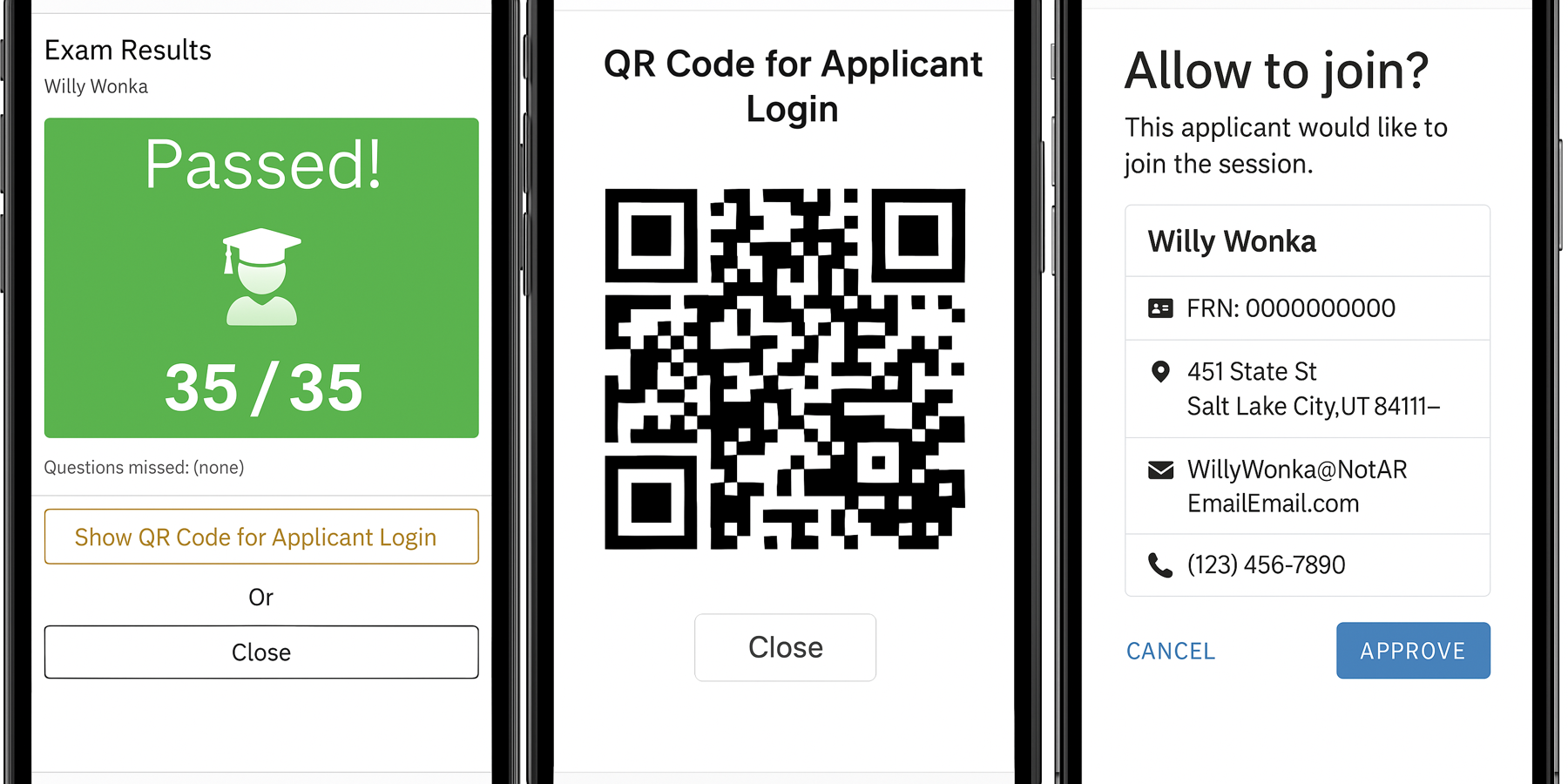
When a VE grades an exam using Gradecam and the applicant passes, a new button appears on the VE’s grading interface:
"Show QR Code for Applicant Login"
Clicking this button would:
1. Generate and display a QR code containing the applicant login link
2. The applicant scans the QR code using their smartphone, which opens and logins in the applicant with the Team ID/PIN automatically
3. Once the applicant connects using the login link, the VE's interface will automatically redirect to the authorization window to approve
This streamlines the transition from grading to final forms
Comments: 3
Oldest
•
Newest
•
Most likes
•
Fewest likes
-
09 May, '25
Heather KM6ZHighlighted comment
Our in-person team grades where the applicant is seated and took the exam. The QR Code would be a really slick way to migrate to a cell phone or tablet. -
09 May, '25
Ben GentleShameless bump for Discord, A feature like this would really be useful at large exam sessions like Huntsville Hamfest or Cons.
-
11 Apr
Ben FranskeAlternatively (or in addition) allow the VE team to set ExamTools to email the applicant a link after grading which they could click on with a mobile device to log in.